

Google Business Profile posts are a free, built-in tool that lets you share updates, offers, events, and product details directly on Google Search and Maps. Whether you run a single storefront or a multi-location business, regular GBP posts help you attract more customers, boost local SEO, and drive real action — without spending a penny. In this guide, you’ll find everything you need: what GBP posts are, the different post types, real examples, image guidelines, and proven tips to optimize every post you publish.
Google Business Profile (GBP) posts allow you to create a free profile and share news, offers, and updates. These Google Business Profile posts appear on both Google Search and Google Maps, making them one of the most visible free marketing tools available to local businesses. You can engage customers by sharing product images with details directly on your listing, helping attract more customers whether you run a chain, multi-location business, or a single-location store.
Now you must be excited to know all about Google My Business Post. Don’t worry, In this Post, i’ll guide you all about How you can create profile, what are the important considerations to keep in mind along with tips. So, Let’s get into it.
What Are Google Business Profile Posts?
A Google Business Profile Post is a valuable tool that allows a business to connect with its potential customers directly on Google Search and Maps via posts. This free marketing tool offered by Google helps business owners appear on Google searches to attract more potential customers. You can engage with customers by creating a Google business profile, showcasing announcements, and events, highlighting promotions, and new product photos.
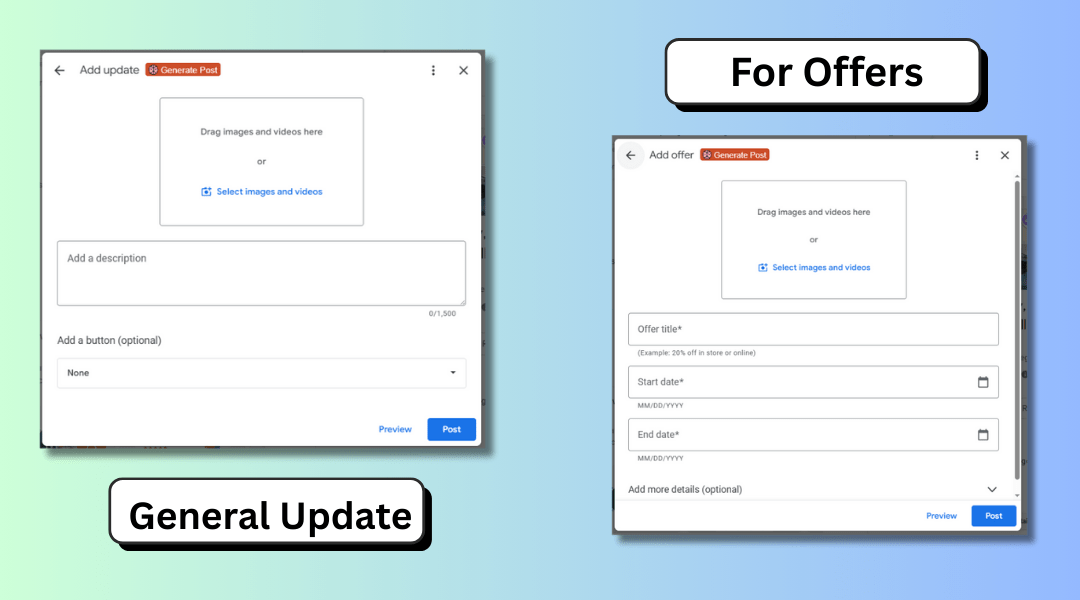
Moreover, you can create posts for the Google Business profile which appear alongside your business details, making it easier for your user to connect with you. This free feature adds personality to your online presence and boosts visibility, even for businesses without a physical location.
Your visibility in online search allows you to add customer calls-to-action such as “Book Now, “Learn More”, or “Buy” and direct traffic to your website. Regular posting keeps your audience informed and connected to your business. A well-managed Google Business Profile builds trust with your audience.
How to Post on Google Business Profile
An attractive Google Business Profile Post is the key element for your business success. Writing an effective GBP Post is easy and simple when you have the right guide. Following is the guide to writing an effective Google Business Profile Post.
1. Understand Your Audience
Understanding your Target audience is the key if you want an effective Google Business profile. The chance of customer engagement increases when you know your audience’s interest and understand what they are looking for.
To understand your audience consider the factors like age, gender, buying interest, preferences, and location. For instance, if you run a fitness studio in a busy urban area, your audience may largely consist of working professionals and health-conscious individuals who prioritize flexible schedules, quick workout options, and wellness-focused services. Once you know your targeted audience write engaging posts that hit their interests and needs.
2. Write Clear, Keyword-Rich Post Content
Google Profile Post is a method of marketing in which you use written words to attract and engage the audience. So it’s mandatory to keep your words direct and clear. For understanding it consider yourself a customer that wants your services or product. Keep the words concise, impactful, and informative.
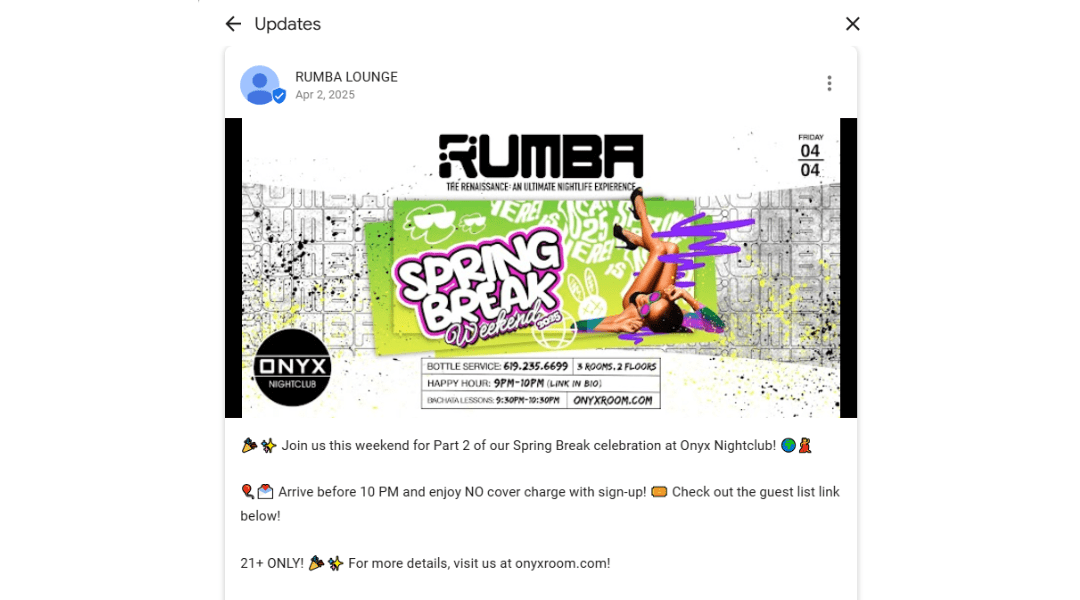
To stand out on Google add related keywords because it helps to optimize your Google Business Profile. Once you optimize your profile you will target the right audience. Another key to writing a perfect post is to cut unnecessary details.
Google does not want any additional details to promote your business so avoid posting unnecessary details. Lastly, To generate active sales must add CTA (Call-to-action) in your post. A well-crafted CTA can significantly improve conversion rates, sales, and engagement.
Want to write high-quality Google Business Profile posts in seconds?
3. Use Images And Videos
A Google Post should always include images and videos. Think about it—would you rather read a book with no pictures, or one that uses visuals to make the content more engaging? Most of us would prefer the second option. It’s human nature: images catch our attention more than words, and videos are even more powerful than images.
To keep your audience engaged with your Google Business Profile, visuals play a vital role. But when using images, it’s important to consider their size and quality to ensure they display correctly on all devices.
GBP Post Image & Video Guidelines
Google recommends the following specifications for images and videos used in Google Business Profile posts:
Image Guidelines
- Size: 10KB to 5MB
- Recommended resolution: 720 × 720 pixels
- Minimum resolution: 250 × 250 pixels
- Format: JPG or PNG

Using high-quality, properly sized images helps your posts look professional and improves engagement.

Best practice:
Use clear, well-lit images that highlight your product or service. Avoid blurry, dark, or low-resolution visuals.
Example:
A clothing store can use a clean, well-lit flat lay showing a t-shirt paired with jeans and sneakers to present a complete outfit and drive clicks.

Video Guidelines
- Duration: Up to 30 seconds
- File size: Up to 75MB
- Resolution: 720p or higher
Short videos help users quickly understand your offering and can increase interaction compared to static images.
4. Add Links and CTAs to Your Posts
Adding links to your Google Business Profile Post is a core element that directs your customers from your GBP profile to your website. When customers get links in your profile it saves them to search your site separately.
GBP Post Character Limit & Size Specifications
Before publishing your Google Business Profile post, make sure your content fits within Google’s limits:
- Post description: Up to 1,500 characters (recommended: 150–300 for readability)
- Offer post title: Up to 58 characters
- Event post title: Up to 58 characters
- Image size: 10KB–5MB, recommended 720×720px, JPG or PNG
- Video length: Up to 30 seconds, max 75MB, minimum 720p
Staying within these limits ensures your post displays correctly on both Google Search and Google Maps.
Types of Google Business Profile Posts (With Examples)
1. Offer posts

Google My Business offer posts are among the most popular post types because they directly drive purchases and in-store visits. Offer posts are a great way to attract your audience by promoting deals, discounts, and special offers on your products or services. They help promote your business and generate more leads, while also allowing you to direct customers to your website through links that increase visits and sales.

The key aim of offer posts is to create a sense of urgency and encourage customers to take immediate action to be it by checking out your website, calling your business, or visiting your location. Offers are highly effective because they grab attention visually on your profile, often resulting in higher engagement and more conversions.
2. Event Posts
Businesses use Event posts to aware the customers if they are arranging any event, launching a product, or gathering. This post informs about the date, time, and other important details about the event. For instance, the New Orleans Jazz & Heritage Festival is going to be held from April 24 to May 4, 2026, in New Orleans Louisiana, U.S.

Events posts are an effective way to promote special occasions, launchings, and business activities. They help increase interaction between your brand and audience because it allows an opportunity to engage with your brand in a more personal way.
Event posts boost both online and in-person visits, making them ideal for attracting new customers. These posts build the trust and loyalty of your customers with your brand.
3. Product Posts
Product posts give visitors a clear visual showcase of the products or services you offer, helping them better understand what your business provides.
This post includes details of your product like name, category, and price, along with its picture. Businesses also use product posts when they are launching any new product.

4. Update Posts
- Regular google business posting through update posts keeps customers informed about products, events, and business changes
- Keeps your audience engaged and your business active
- Inconsistent posting leads to lost trust and lower engagement

What to Post on Google My Business: Quick-Reference Table
Not sure what to post on Google My Business? Here’s a quick breakdown of the four main post types and when to use each one:
| Post Type | Best For | Post Frequency |
|---|---|---|
| Offer Posts | Promotions, discounts, limited-time deals | Weekly or during sales |
| Event Posts | Launches, workshops, in-store events | As events are scheduled |
| Product Posts | New arrivals, featured items, services | Bi-weekly |
| Update Posts | News, hours changes, announcements | Ongoing |
Use offer and event posts to create urgency, and update posts to keep your profile fresh between campaigns.
GBP Posting Strategy: How to Optimize Your Posts
1. Use Related Keywords
A business wins when it’s easier to access. Related keywords do that for your business. While posting on your Google My Business Profile add relevant keywords in your post to attract your targeted audience. When you use them it helps your customers to reach your profile directly.
Adding keywords doesn’t mean stuffing your post with keywords but adding them naturally with the flow. A good idea is to use the keywords that Google suggests while searching in the search bar because it is what people look for.
2. High-Quality Images and Videos:
A secret to adding more value and grabbing more clicks to your website is: eye-catching visuals. If you own a Google My Business Profile, you need to understand the importance of posting quality images and videos. Imagine you want to order something online and when you search online, a few websites pop up.
Some of them represent their product amazingly and others posted low-quality content. High chances are: that you will buy from where you get a good presentation of the product. So use quality images and videos to increase the leads.
3. Use special attributes
Use some attributes related to your business, if applicable in your post. Many businesses add extra details to their listing to make it easier for your customers to learn and take immediate action. For instance:
- Hotels show their ratings, listing things such as free breakfast or pool, adding check-in and check-out times, and sharing links so people can book a room directly.
- Restaurant uploads their menu, and food pictures allowing people to book tables online.
- Services Businesses like Repair shops, Event managers, and Salons list the services they offer. It allows customers to know what to expect.
- Doctors and other healthcare providers let patients book appointments online.
These features help make business listings more useful and help customers find what they need quickly.
4. Add a custom description
You are allowed to add 750 words of custom descriptions in a GBP post. The description appears on Google Search and Google Maps so use these words to attract customers. Write an effective description that encourages customers to act immediately.

5. Encourage and answer reviews
Reviews can help new customers choose your business over others. People can leave reviews directly on your business profile or Google Maps. The best way to get more reviews is to share your review link. You can:
- Add it to your email messages
- Post it on social media
- Put it on signs inside your store (you can even shorten the link to make it easier to remember)
Always respond to reviews—both good and bad. Research shows that customer reviews are one of the most trusted sources of information when people are deciding what to buy or where to go.
- For positive reviews, thank the customer for their kind words.
- For negative reviews, thank them as well, and politely respond to their concerns. Be honest, respectful, and try to offer a solution if needed.
If you are worried about fake or harmful reviews don’t stress you can report them. If a review breaks the rules, Google can remove it from your profile.
How to Write GBP Posts with Google My Business Post Guidelines
Google has specific guidelines governing what you can and cannot include in your Google Business Profile posts. Following these rules prevents post rejection and account suspension:
| Allowed | Not Allowed |
|---|---|
| Promotions, events, product updates, and business news | Profanity or offensive language |
| Links to your website or landing pages | Personal information (phone numbers, emails in post body) |
| High-quality images and short videos | Misleading claims or fake offers |
| HTML or excessive capitalization |
Google may reject posts that violate these guidelines without warning. Always review the Google Business Profile content policy before publishing.
Google My Business Post Ideas to Try This Month
If you’re new to posting for your business, it can be hard to know where to start. Here are 10 simple and creative post ideas for your business to keep your customers engaged during this season:
- Announce an event: Host something fun like a weekend book reading session for kids or an online book club meet-up. Try to offer some meal with it.
- Share a special offer: Try a “Buy 2, Get 1 Free” deal or a limited-time discount on bestsellers. Customers love finding good deals when browsing online.
- Highlight new arrivals: Show off the latest product in your collection to excite your customers.
- Celebrate the season: Post cheerful messages or recommend products from your collection that match the current mood or vibe of the month.
- Give helpful updates: Let people know about your updated store hours, delivery services, or safety measures.
- Share a great review: For example: “Emma said, ‘This Website is a hidden gem with great selection and super friendly staff!’”
- Feature a top pick: Recommend one product each week to help your audience discover something new.
- Celebrate milestones: Share moments like selling a 1000th product from your collection, completing a year in business, or opening a new branch.
- Show behind-the-scenes moments: Introduce your team, share fun photos, or show how you manage the team.
- Thank your customers: A simple thank-you post encourages customers to show appreciation and build loyalty.
These ideas will help keep your business active, build trust, and stay connected with your audience throughout the season.
Final Thoughts on Google Business Profile Posts
Google Business Profile is a free and powerful way to promote your business. A well-maintained Google Business Post is a game-changer for business growth. It helps you appear on Google Search and Maps by boosting your visibility online. Your visibility on Google attracts new customers and keeps your audience engaged.
Once you sign in to GBP you can post updates, offers, events, and product details. By posting regularly, sharing updates, showcasing products, and using engaging visuals, you create a strong digital presence that builds trust and drives action. Use clear words and high-quality images or videos to attract attention.
Don’t forget to optimize your content with relevant keywords, avoid low-quality images and videos, and include clear calls to action. Use features like special offers, event highlights, and service details to stay connected with customers. When used well, your profile can increase sales, improve engagement, and grow your business without spending a penny.